Posts

Showing posts with the label Jpeg

My Fujifilm X-E2 film recipes for Landscapes
Image
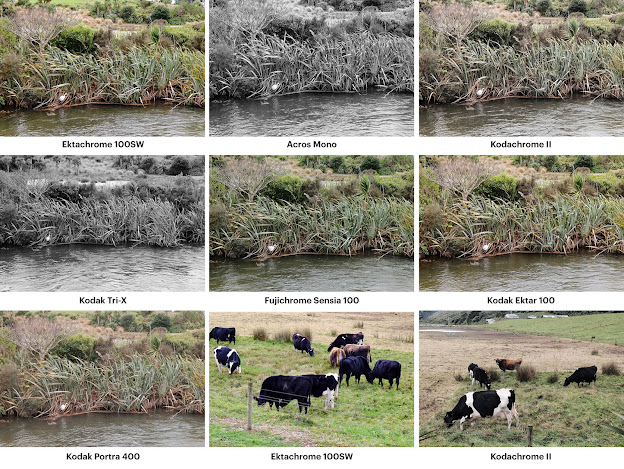
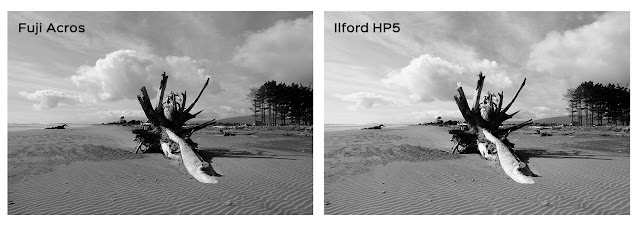
Now that I have gone through my seven custom film simulation recipes on my Fujifilm X-E2 (see previous blog posts), the final stage of the process is to do a comparison. This will help me decide which custom recipe I want to use, depending on the subject and feeling I'm after in my photo.  I think I have a pretty good idea anyway, but seeing them all together will help me confirm my suspicions. The first time I did this, I discovered that all my recipes were far too similar, and I decided to start over again from scratch. Hopefully this time will be different? Black and White film simulation comparison for landscapes. Fuji Acros v Ilford HP5 Since I mostly shoot landscapes, I thought I'd start there with my comparisons. The image itself isn't anything spectacular, and it's taken at the wrong time of the day - noon on a bright day. But this is also a fairly good test since the dynamic range is at the extremes of what the sensor can handle. The compressed images for the w...

Urban exploration with the Fujifilm X-E2

Image
Last weekend (as I write this) I was in the neighboring town of Hokitika to try out my Ilford HP5 film simulation. I found myself wandering the back-streets on a drizzly afternoon - ideal conditions for black and white images, but not my normal subject matter. Although I wasn't really expecting much, I actually came away with a couple of images that I loved, and that really excited me (see the post here ). Urban exploration really isn't my thing - mostly because I live in a small town and don't really think of it as somewhere worth exploring (familiarity really does breed contempt)! But my brief afternoon spent exploring the streets of Hokitika made me re-evaluate that a little. I decided that if similar conditions (drizzly and cloudy) represented themselves here in Greymouth where I live, then I would take the opportunity to go out and explore my local town. All you need is Love. Fuji X-E2 with XC16-50mm. f/5.6 @ 1/280th, ISO 400. Ilford HP5 recipe This being Greymouth, I...

Portra 400 film recipe for Fujifilm X-E2

Image
I've been shooting Jpeg-only with my X-E2 for about a month now, and have finally tested out all my film simulation recipes. The last one to test, as indicated in the heading for this post, was my Kodak Portra 400 film recipe - in the C4 slot on my X-E2. Motukiekie Moonscape. Fujfilm X-E2 with XC16-50mm. f/11 @ 1/3rd sec, ISO 100. Portra 400 recipe I've left testing the Portra 400 recipe until last because I think of it as fitting a fairly specific scenario. And I guess the clue is in the name - Portra. Do a quick Google search for Portra 400 on the interwebs and you will get hundreds of the kinds of images that this film was designed for.... Portraits. As you can tell from my blog, I don't do a lot of portraiture. Not now anyways. I used to spend most weekends shooting Weddings, and I guess the Portra film simulation would have come in very handy in those settings. But now I'm mainly a landscape photographer (if I'm choosing what to shoot), so a 'Portra' s...

My C6 Fujifilm custom film recipe: Ilford HP5

Image
I've probably mentioned before (a few times) that when I shoot 'real' film, I often choose black and white. Firstly for practical and budget reasons - it's cheaper and I can develop it myself. But second for aesthetic reasons - I love the look you get from true black and white film stocks. Black and white conversions from colour are not quite the same. And nor is shooting on the 'monochrome' setting on DSLRs. Lake Mahinapua Sludge. Fujifilm X-E2. f/8 @ 1/240th, ISO 400. 'C6' Ilford HP5 recipe Now having said that, I believe that the closest you can get to a 'true' black and white result shooting on digital is with the Fujifilm simulations (without selling your children and a kidney to buy the Leica Monochrom). For a start, the newer X-Trans III cameras have the Fuji Acros film look built right into the camera - how good is that! But even if, like me, you've got an older generation Fujifilm body, then the custom film simulations come to the ...

Should you post-process a Fujifilm Jpeg?

Image
One of the major arguments for shooting Jpegs instead of RAW is that the 'look' you want is already baked into the file and you don't need to post-process the image. The whole SOOC (straight out of camera) movement has become very popular with the rise of Fuji film simulations and custom 'recipes'. I'm having a blast shooting with my custom film recipes on the Fuji X-E2 - but does this really mean that I'm only showing images SOOC? Is there no post-processing involved at all? And if there is, how much can you do on 'only' a Jpeg? Well, to answer the first question - No, I'm not just showing images SOOC. I do still process my Jpegs to get the final image. Some admittedly more than others. I thought it might be worthwhile looking at a few recent examples, where I have done a reasonable amount of post-processing work on a Jpeg, and discuss why. Original image. E100SW recipe SOOC On a recent trip to Rapahoe Beach to try out my Acros film recipe (post...

My Kodak Gold 200 film recipe for the Fujifilm X-E2

Image
There's an old saying that goes "Make hay while the sun shines". Here on the South Island's West Coast (sometimes jokingly referred to as the 'Wet' Coast), you have to take that saying to heart and make photographs while the sun shines! The long-range forecast for the coming week (as I write this) is not looking great. Rain, with the chance of rain, interrupted by the occasional downpour of rain. So yeah, not good. Yes, I know, rain makes for great moody landscape photos. But I'm sorry, it's just not me. I can't really understand looking outside at the pouring rain and thinking "great - time to go and take photos"!? For a start, my gear isn't weather-sealed, so that's not good. But even when I did have weather-sealed camera gear, the last thing I really wanted to be doing with it was slogging around in the wet, constantly struggling to keep the front lens element clear of rain (not to mention my own glasses), just so I could catc...

Jpeg-only week two with Kodak E100SW film simulation

Image
I'm in to my second week of shooting on Jpeg-only using film simulations SOOC (straight out of camera), and so far, so good. This week it was the turn of the film simulation that I have programmed into the prime slot (C1) on my Fujifilm X-E2. What's the recipe that deserves this prime location? None other than Kodak Ektachrome E100SW. To be honest, it's not a film stock I've actually shot a lot of, since processing slide film here in New Zealand is a costly business. I've basically chosen it because I liked the look of the images that accompanied this recipe on Richie Roesch's Fuji X Weekly site.  Tiphead Sunset, Cobden.  f/8 @ 1/250th, ISO 400. Ektachrome E100SW film simulation For my 'main' recipe, I wanted something that had some vibrancy, but not as intense as the Velvia recipe. On Kodak's own technical data sheet it describes E100SW as "producing warm, saturated colors (the SW stands for saturated warm)" . They also claim it is "w...

Jpeg-only week one with Velvia Film simulation

Image
It's my first week of shooting in Jpeg-only with custom film simulations on my Fujifilm X-E2, and I've already completely rearranged my recipes! Cobden Lagoon, early evening . X-E2 with 16-50mm XC. f/8 @ 1/20th, ISO 3200. Velvia recipe In my last post I explained how I've set up the seven custom slots to allow for white balance adjustments for each film recipe. This relies on heavy use of similar film stocks that use the same WB channel adjustments. Mostly, this meant using Kodak film recipes. But when I took a series of test images (again, see last post), I came away feeling that there wasn't enough variance in the final results. All the images looked a bit too similar.  So, I decided to start from scratch, and have now programmed in a whole new set of recipes that are hopefully going to give me a bit more variance between 'looks'. I've kept the first two film simulations from my previous set (Kodak Ektachrome 100SW and Fuji Acros), and have add...

WB settings for film simulations in my Fujifilm X-E2

Image
In my last post I discussed 'going 100% Jpeg'. This may sound scary to some photographers for who shooting Raw is almost a religion (and yes, that was me too). It's really only been made possible - for me at least - by shooting with the Fuji custom film simulations (or recipes). Fujifilm expects you to play around with film simulations and create your own - that's what their X-Raw Studio software is all about. Unfortunately, my X-E2 is not compatible with X-Raw Studio (I presume it only works for X-Trans III sensors and above?). Fortunately, others have done the hard work for me already, and there are a plethora of film simulations on-line to choose from (check out the amazing Fuji X Weekly blog). All sorts of parameters can be tweaked to create a 'look' you're after; from highlight and shadow tone, to sharpness and colour - and even grain and clarity on the latest Fuji camera models (alas, again, not my X-E2!) To get the very best out of these ...